
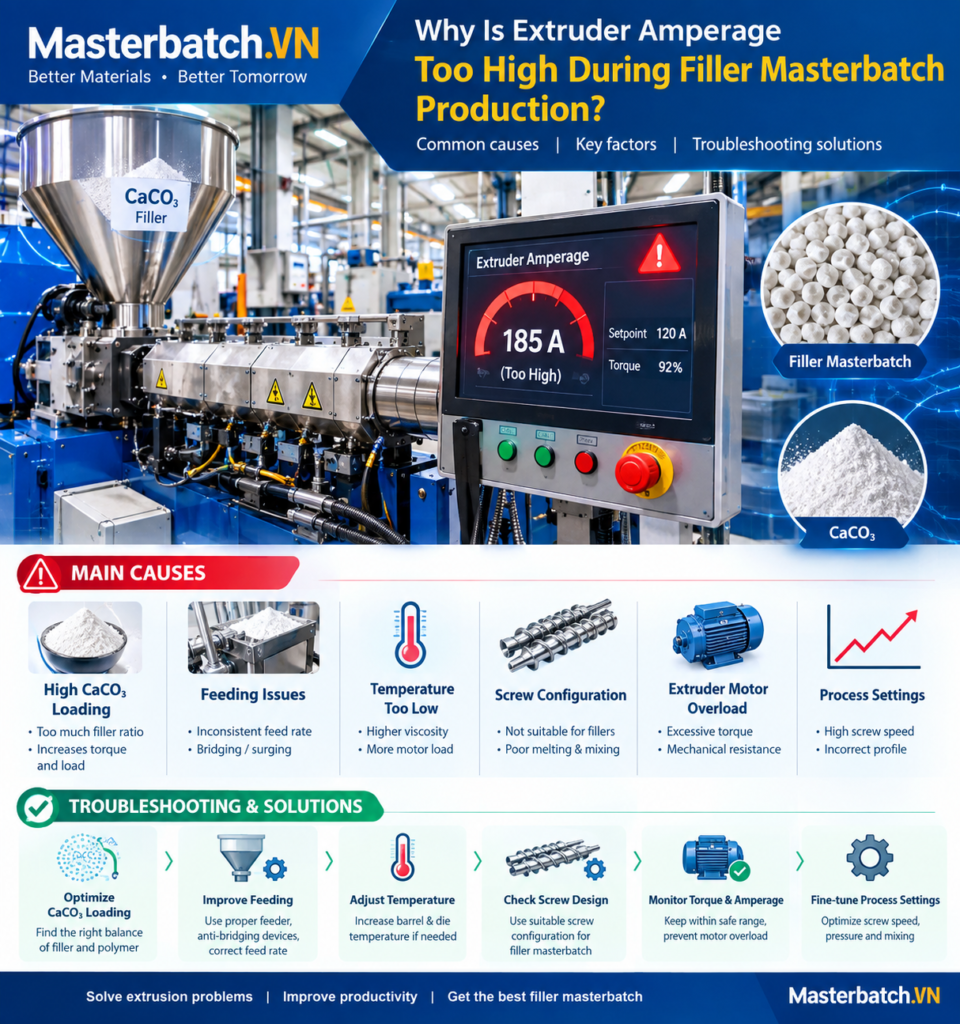
Why Is Extruder Amperage Too High During Filler Masterbatch Production?
High extruder amperage is one of the most common process problems encountered during filler masterbatch production, particularly when manufacturing high-loading CaCO₃ masterbatch using a twin-screw extruder.
When the motor current rises above the normal operating range, the extrusion line may experience unstable feeding, excessive torque, poor dispersion, low output, inconsistent pellet quality, or even motor overload and automatic shutdown.
Understanding the relationship between filler loading, feed rate, screw configuration, melt viscosity, temperature, moisture and torque is essential for stable filler masterbatch production.
1. What Does High Extruder Amperage Mean?
Extruder amperage represents the electrical current required by the motor to rotate the screw system under a specific processing load.
In simple terms:
Higher mechanical resistance → higher screw torque → higher motor current.
For filler masterbatch, the extrusion load can become particularly high because CaCO₃ is loaded at a relatively high concentration. A formulation containing 70–85% calcium carbonate can create significantly higher processing resistance than conventional polymer compounds.
However, a high amperage reading should not automatically be interpreted as a problem with the motor. It is often an indication that the extrusion system is experiencing excessive mechanical or rheological load.
2. Main Causes of High Amperage in Filler Masterbatch Production
2.1 Excessive CaCO₃ Loading
The first factor to check is the filler concentration.
Increasing CaCO₃ content reduces the proportion of polymer carrier available to wet and encapsulate the mineral particles. At very high filler loading, the compound can become more difficult to plasticize and transport through the screw.
For example, increasing filler loading from 70% to 80–85% may significantly increase torque if the formulation and processing conditions are not adjusted accordingly.
Typical symptoms:
- Motor current increases as filler loading increases.
- Melt pressure becomes higher.
- Extruder output becomes unstable.
- Pellet quality may deteriorate.
- Motor torque approaches the machine limit.
2.2 Feed Rate Is Too High
Another common cause is excessive material throughput.
If the gravimetric feeder introduces more material than the screw can effectively melt, wet and convey, the screw becomes overloaded.
This can occur when the operator increases the feeder rate without proportionally increasing screw speed or adjusting the formulation and temperature profile.
A useful practical relationship is:
Higher feed rate + insufficient conveying capacity = higher screw filling + higher torque.
2.3 Screw Speed Is Too Low for the Selected Feed Rate
Many operators assume that reducing screw speed will always reduce amperage. This is not necessarily correct.
If the feed rate remains high while screw speed is reduced, the screw can become more heavily filled. The increased material residence and compression can cause higher torque.
Therefore, screw speed and feed rate should be considered together rather than independently.
2.4 Excessive Moisture in CaCO₃ or Raw Materials
Moisture can strongly affect filler masterbatch processing.
Wet calcium carbonate may cause feeding instability, agglomeration, poor dispersion and unstable melt behavior. In some formulations, moisture can also interfere with the interaction between the filler surface, polymer carrier and processing additives.
Before extrusion, operators should monitor:
- CaCO₃ moisture content
- Polymer moisture
- Storage conditions
- Ambient humidity
- Feeder and hopper conditions
Moisture is particularly important when producing high-filler formulations because a relatively small amount of water can have a noticeable effect on processing stability.
2.5 Poor CaCO₃ Dispersion or Agglomeration
Calcium carbonate must be sufficiently wetted and dispersed by the polymer and processing system.
If large agglomerates enter the extrusion zone, the screw may experience localized resistance. This can increase torque and cause unstable amperage.
CaCO₃ particle size distribution, surface treatment, particle morphology and surface compatibility can all influence processing behavior.
2.6 Insufficient Polymer Carrier
The polymer carrier plays an important role in wetting and transporting the mineral filler.
If the carrier content is too low for the selected filler loading, there may not be enough polymer phase to effectively coat the CaCO₃ particles.
This can result in:
- Higher melt viscosity
- Poor filler wetting
- Higher torque
- Poor dispersion
- Unstable extrusion
For high-loading filler masterbatch, formulation optimization is therefore more important than simply increasing CaCO₃ concentration.
2.7 Incorrect Temperature Profile
Temperature has a direct influence on polymer melt viscosity.
If the temperature is too low in critical melting and mixing zones, the polymer may not melt sufficiently. The material then passes through the screw system with excessive resistance, causing motor amperage to increase.
However, simply increasing every barrel temperature is not always the correct solution. Excessive temperature can cause polymer degradation, discoloration, volatile generation and changes in final product properties.
The temperature profile should therefore be designed according to the polymer carrier, filler system, screw configuration and production speed.
2.8 Screw Configuration Creates Excessive Shear or Compression
Twin-screw extruders are highly dependent on screw configuration.
Intensive kneading blocks, reverse elements and high-compression sections can increase mixing intensity and residence time. While these elements may improve dispersion, excessive use can significantly increase torque.
A screw configuration for high-loading filler masterbatch normally requires a balance between:
- Solid conveying
- Polymer melting
- Filler feeding
- Filler wetting
- Dispersive mixing
- Distributive mixing
- Pressure generation
- Die conveying
The objective is not maximum shear. The objective is sufficient dispersion with acceptable torque and stable throughput.
2.9 Die or Screen-Pack Resistance Is Too High
High amperage can also originate downstream of the screw mixing section.
A blocked screen, excessive filtration resistance, restricted die holes or an unsuitable die design can increase melt pressure.
When downstream pressure rises, the screw must generate additional force to push the melt through the restriction. Motor torque can consequently increase.
When troubleshooting, operators should therefore monitor both:
- Extruder motor amperage
- Melt pressure before the die
2.10 Melt Viscosity Is Too High
Different PE and PP carrier systems have different rheological behavior.
A carrier with higher melt viscosity can require greater torque, particularly at high filler loading.
For this reason, MFI/MFR should be considered when selecting the polymer carrier for filler masterbatch.
However, a higher MFI polymer is not automatically better. The carrier must also provide the mechanical, thermal and application properties required by the final plastic product.
3. How to Diagnose High Amperage Step by Step
A systematic troubleshooting procedure is more reliable than changing several parameters simultaneously.
Step 1 – Check the Actual Feed Rate
Verify the gravimetric feeder calibration and actual kg/h.
Compare the current production rate with the validated operating range for the extruder.
Step 2 – Check Screw Speed
Record screw RPM and compare it with the normal production recipe.
Do not evaluate RPM independently from feed rate.
Step 3 – Check Motor Load and Torque
Record:
- Motor current
- Motor torque percentage
- Screw RPM
- Extruder output
- Melt pressure
This data helps determine whether the problem is related to throughput, material rheology or downstream resistance.
Step 4 – Check Barrel Temperature
Compare actual temperature with the validated process recipe.
Check whether one heating zone is significantly colder than expected. A cold zone can cause incomplete melting and increase mechanical resistance.
Step 5 – Check CaCO₃ Moisture and Feeding Behavior
Inspect the filler for moisture, bridging, rat-holing and inconsistent feeding.
High-loading filler systems require stable powder feeding because fluctuations in mineral concentration can immediately affect torque.
Step 6 – Inspect Screen Pack and Die Pressure
If melt pressure is unusually high, inspect the filtration and die system.
A gradual increase in pressure during a production run may indicate contamination or screen blockage.
Step 7 – Review the Screw Configuration
If the problem persists despite normal material feeding and temperature, review the screw design.
Excessive kneading or reverse elements may create unnecessary torque for the target filler formulation.
4. Relationship Between Amperage, Torque and Output
In practical extrusion operation, three variables should be monitored together:
| Parameter | What It Indicates |
|---|---|
| Amperage | Electrical load required by the motor |
| Torque | Mechanical resistance against screw rotation |
| Output | Actual production throughput |
A useful troubleshooting principle is to compare the change in these three parame
filler masterbatch extrusion high extruder amperage filler masterbatch production twin screw extruder amperage CaCO3 masterbatch extrusion extruder motor overload high torque in twin screw extruder filler masterbatch troubleshooting calcium carbonate masterbatch extrusion processing problems CaCO3 filler masterbatch twin screw extrusion masterbatch extrusion troubleshooting extruder torque masterbatch manufacturing